
Last updated: June 1, 2026
I haven’t bought a handheld yet. I’m still in research mode, looking at this from a PC builder’s lens. I’ve been running an AMD Ryzen 7900X with an RX 7900 XT for the past couple of years, and I know my way around specs. So here’s how I’d think about Steam Deck vs ROG Ally if I had to pick today, after Valve just made the decision a lot more complicated.
On May 27, 2026, Valve quietly raised Steam Deck OLED prices by $240-300. The device that used to be the obvious “best value handheld” now starts at $789. The ROG Xbox Ally, meanwhile, is sitting at $599.99.
That price flip changes everything about this comparison.
TL;DR: Which One Should You Buy?
Pick the Steam Deck OLED ($789) if: you want the best out-of-the-box experience, primarily play from your Steam library, travel frequently and need real battery life, or you hate dealing with Windows on a 7-inch screen.
Pick the ROG Xbox Ally ($599.99) if: you want Xbox Game Pass natively, need access to non-Steam launchers, prioritize raw FPS over battery, or the $190 price difference matters to your budget.
Pick the ROG Xbox Ally X ($999.99) if: you want maximum performance regardless of cost and you’re okay with a device that needs active management to get the best out of it.
For most people: the base ROG Xbox Ally is now the value play. That’s a weird sentence to write in 2026, but here we are.
2026 Pricing: The RAMageddon Effect
| Device | Storage | Price (June 2026) | Change |
|---|---|---|---|
| Steam Deck OLED | 512GB | $789 | +$240 from $549 |
| Steam Deck OLED | 1TB | $949 | +$300 from $649 |
| Steam Deck (Refurb LCD) | 256GB | $319 | — |
| Steam Deck (Refurb OLED) | 512GB | $629 | — |
| ROG Xbox Ally | 512GB | $599.99 | No change |
| ROG Xbox Ally X | 1TB | $999.99 | No change |
This is the table that changes the whole comparison. I’m showing current prices because most reviews you’ll find online predate May 27, 2026.
Valve’s explanation: rising memory and storage costs driven by AI infrastructure demand. The component price spike hit DRAM and NAND flash especially hard in early 2026, and Valve passed that cost directly to buyers. The hardware didn’t change. The specs are identical. You’re paying more for the same device.
One note worth making: [VERIFY] ROG Xbox Ally pricing before publishing, given how fast this market is moving, ASUS could follow Valve’s lead on price adjustments. Valve themselves acknowledged the increase “may not be permanent” if component costs stabilize, which they currently show no signs of doing.
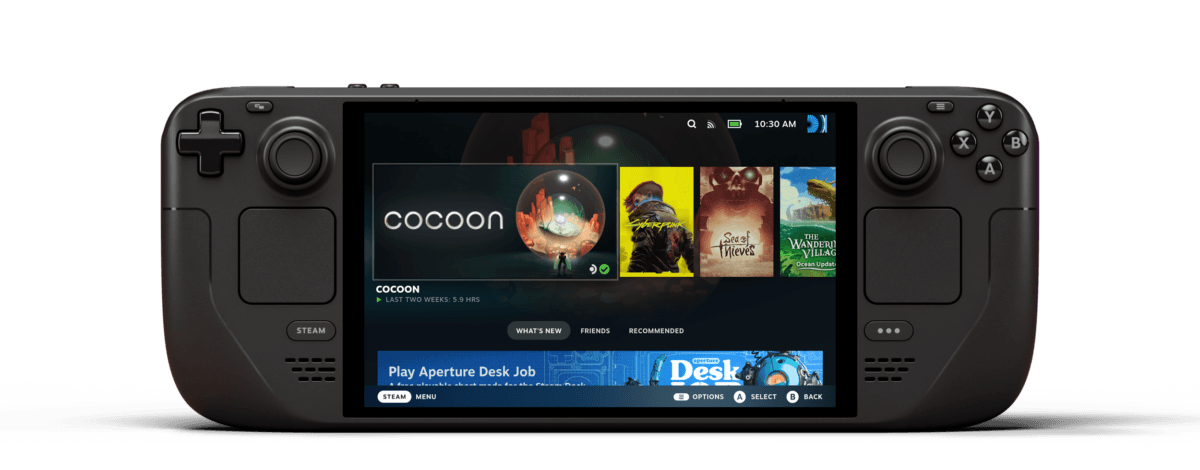
Quick Spec Comparison
| Spec | Steam Deck OLED | ROG Xbox Ally | ROG Xbox Ally X |
|---|---|---|---|
| APU | AMD Aerith (4-core Zen 2, RDNA 2) | AMD Ryzen Z2 A (4-core Zen 2, RDNA 2) | AMD Ryzen AI Z2 Extreme (8-core Zen 5, RDNA 3.5) |
| RAM | 16GB LPDDR5 | 16GB LPDDR5-6400 | 24GB LPDDR5X-7500 |
| Storage | 512GB / 1TB NVMe | 512GB NVMe M.2 2280 | 1TB NVMe M.2 2280 |
| Display | 7.4″ OLED, 1280×800, 90Hz | 7″ IPS, 1920×1080, 120Hz | 7″ IPS, 1920×1080, 120Hz |
| Battery | 50Wh | 60Wh | 80Wh |
| Real-world battery (AAA) | 2-3 hours | 1.5-3 hours | 3-4 hours |
| OS | SteamOS 3.x (Linux) | Windows 11 Home | Windows 11 Home |
| Weight | 640g | ~678g | 715g |
| Price | $789 / $949 | $599.99 | $999.99 |
The Z2 A architecture being Zen 2 (not Zen 4 as some early coverage incorrectly stated) is confirmed in AMD’s official spec documentation and on ASUS’s product pages. This matters for the base Ally vs Steam Deck comparison: they’re genuine architectural peers on the CPU side.
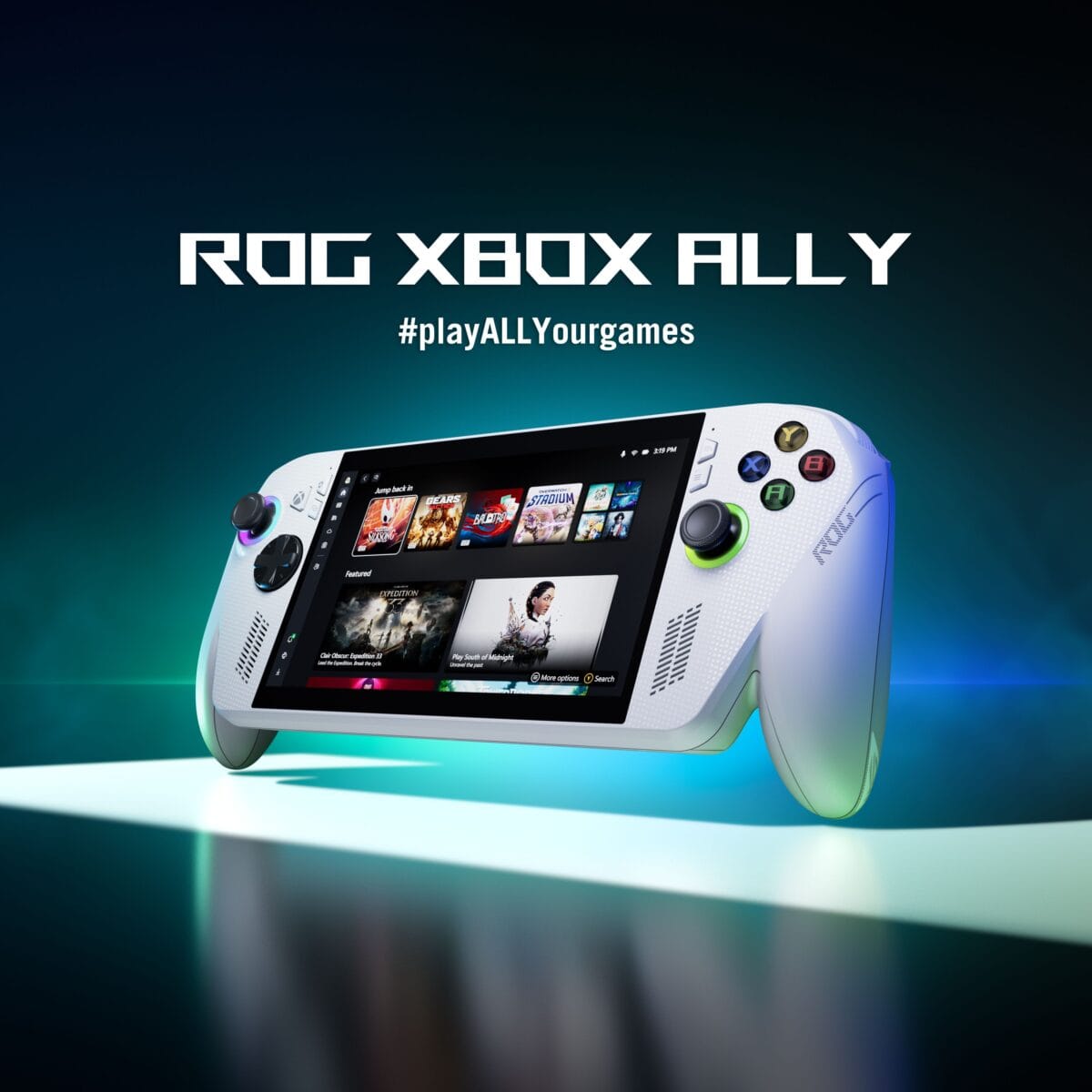
The APU: Aerith vs Ryzen Z2 (And What That Means If You Own a Desktop GPU)
The Steam Deck runs a custom AMD APU Valve calls “Aerith” (four Zen 2 cores paired with RDNA 2 graphics). It was already a couple of generations old when the original Steam Deck launched in 2022, and nothing has changed about that.
The ROG Xbox Ally base model uses AMD’s Ryzen Z2 A, and here’s something most reviews skip: the Z2 A is also a Zen 2-based architecture with eight RDNA 2 graphics cores, despite the newer “Z2” branding. It’s a four-core chip with refinements over the original Aerith, but it’s not the generational leap the name implies. The Ally X gets the Ryzen AI Z2 Extreme, which is the actual heavy hitter: an eight-core processor built on the much newer Zen 5 architecture with RDNA 3.5 graphics and AMD’s XDNA NPU layer baked in.
As someone who runs a 7900X on my desktop (a Zen 4 chip), I can tell you what generational architecture jumps actually mean: each generation typically brings 10-20% IPC improvements, better branch prediction, and lower power draw at the same performance level. Zen 5 (in the Ally X) is two full generations ahead of the Zen 2 silicon in the base Ally and the Steam Deck. That’s where the real performance gap lives. Reviewer testing puts the Ally X 20-40% ahead of the Steam Deck in most demanding titles when both are running at higher power profiles.
The base ROG Xbox Ally is closer to the Steam Deck than the spec sheet branding suggests. Both run Zen 2 cores capped at similar TDP envelopes. The Ally has a faster screen and Windows flexibility. The Deck has SteamOS optimization and a better display panel. They’re peers in raw silicon, despite the marketing.
If you want the real performance ceiling, you need the Ally X, and you’re paying $999 for it.
RAM: 16GB vs 24GB and Why It Matters Less Than You Think
Both the Steam Deck and the base ROG Xbox Ally ship with 16GB of LPDDR5. The Ally X bumps this to 24GB LPDDR5X-7500.
For gaming in 2026, 16GB handles everything you’d want to play on a handheld. Where 24GB becomes relevant is if you’re actually using the Ally as a PC, running a game plus a browser plus Discord, for instance. The Ally X’s extra RAM headroom gives you genuine multitasking capability. On the Steam Deck, that use case barely comes up since SteamOS is focused entirely on gaming.
If you’re comparing purely for gaming: 16GB is fine on both. The Ally X’s 24GB is a bonus for people who want their handheld to double as a lightweight PC.
Display: OLED 90Hz vs IPS 120Hz
This is where I’d push back on the spec sheet. The OLED panel on the Steam Deck punches well above its specs on paper.
The Steam Deck OLED has a 7.4-inch panel running at 1280×800 resolution with a 90Hz refresh rate and true OLED, which means per-pixel lighting, absolute blacks, and color accuracy that the ROG Ally’s IPS display simply can’t match.
The ROG Xbox Ally runs a 7-inch 1920×1080 IPS at 120Hz. Higher resolution, faster refresh. For fast-paced shooters on the handheld, that 120Hz at 1080p sounds compelling on paper. In practice, hitting 120fps consistently in demanding games on a 15-25W handheld APU is rare. You’d mostly be gaming at 40-60fps anyway, where the display refresh advantage disappears.
The OLED panel is a bigger deal for the actual experience. Gaming indoors in a dim room, and most handheld gaming happens indoors, OLED’s contrast and color depth genuinely improve the experience. Movies, older titles, indie games: the Steam Deck wins on screen quality, even with the lower resolution.
Bright outdoor gaming? The Ally’s 500 nits IPS can hold up better in direct light. OLED panels have historically struggled there, though the Deck’s OLED does better than most.
Battery: The Gap Nobody Talks About Honestly
The spec sheets make this confusing, so here’s what reviewer testing actually shows.
The Steam Deck has a 50Wh battery. The base ROG Xbox Ally has a 60Wh battery. The Ally X has 80Wh. By raw numbers, the Ally should have more range.
It doesn’t, in most scenarios.
SteamOS is optimized specifically to run games at 15W TDP, and that efficiency dividend is massive. The Deck’s 50Wh battery with a capped 15W draw gives you 2-3 hours in demanding AAA games and 4-6 hours or more in lighter titles. Some indie and emulation scenarios push past 6 hours.
Windows 11 on the ROG Ally draws more power just sitting at idle because of background processes, Windows Defender, update services, telemetry, and everything else a full desktop OS runs at boot. The base Ally gets 1.5-3 hours in AAA games. Lighter titles improve things, but the baseline OS overhead is always there.
The Ally X’s 80Wh battery closes the gap meaningfully, 3-4 hours in demanding games, up to 10 hours in light 2D titles at low TDP. But it’s also $999.99.
For actual portable use, planes, trains, couch to couch, the Steam Deck OLED’s battery advantage is real and tangible. The Ally base model has a reputation for aggressive hunting for outlets that the Deck doesn’t.

OS: SteamOS vs Windows 11 Is the Biggest Decision You’ll Make
Everything else in this comparison is hardware. This is software, and software is what you actually live in.
SteamOS feels like a game console. You turn it on, it goes to your game library. You pick a game. It plays. Sleep and resume work reliably. You don’t see update notifications mid-session. You don’t get Windows Defender running in the background. The experience is polished in a way that a PC gamer will genuinely appreciate, because it removes all the PC friction that doesn’t need to be there.
The tradeoff: SteamOS runs on Linux. Most Steam games work through Proton compatibility, compatibility that has gotten dramatically better through 2025 and into 2026. Anti-cheat-heavy multiplayer games (certain competitive shooters) are still the exception. If your entire gaming library is Steam and you mostly play single-player games, SteamOS compatibility issues are basically a non-problem.
Windows 11 on the ROG Xbox Ally is a full desktop operating system on a 7-inch screen. It works. But Windows 11 was not designed for a 7-inch touchscreen handheld, and you feel that constantly. ASUS added a GameFirst overlay on the Xbox Ally to make it more console-like, and the Xbox button integration helps. But updates still interrupt sessions. Drivers still need managing. The first-run setup experience is more involved than pressing power and seeing your games.
What Windows gives you in return: native Xbox Game Pass, Epic Games Launcher, EA App, non-Steam DRM platforms, and the ability to genuinely use the device as a small PC. If you play a lot of Xbox Game Pass titles or you’re coming from a PC setup where your library is spread across multiple launchers, the Ally makes more sense.
The current stable SteamOS build is 3.7.25, with 3.8.5 in beta. Valve’s been actively expanding SteamOS to third-party hardware, the Legion Go S ships with it by default, and Lenovo’s Legion Go 2 SteamOS edition launched in June 2026 at $1,199 as the first premium SteamOS device outside Valve’s own hardware. So the OS is healthier and more available than it’s ever been.
Ergonomics: Based on Hands-On Coverage
Reviewers have consistently flagged the same patterns here:
Steam Deck: Larger form factor, wider grip, rear touchpads that are genuinely useful for games without native controller support. The joysticks are positioned lower than a traditional controller (below the face buttons), which takes adjustment if you’re coming from Xbox/PlayStation controller muscle memory. Heavier than the original LCD at 640g, but the weight is distributed well.
ROG Xbox Ally: Closer to a standard Xbox controller layout, which will feel immediately familiar for console gamers. Smaller overall, easier to slip into a bag. The Ally X added Xbox-style impulse triggers with HD haptics, which reviewers have consistently praised. Build quality is solid, with better ventilation than the base Ally for sustained performance. One common criticism: the D-pad is functional but feels like the weakest input on the device.
Neither handheld has bad ergonomics. The Ally’s controller-familiar layout is a real advantage for newcomers. The Deck’s rear touchpads are an advantage for specific use cases (emulation, strategy games with lots of inputs).
Use Case Winners
Emulation: Steam Deck. SteamOS’s EmuDeck integration makes setting up emulators a one-click process, and the resolution (1280×800) is well-suited for retro game pixel scaling. The touchpad inputs also help with games that need mouse-like precision.
AAA gaming (plugged in): ROG Xbox Ally X. When you’re not worried about battery and you want maximum frame rates on newer games, the Z2 Extreme puts up 20-40% better performance than the Deck in demanding titles. The performance ceiling is real.
AAA gaming (on battery): Steam Deck. The Ally X closes the battery gap enough that it’s competitive, but the Deck is still the more reliable portable gaming device for longer unplugged sessions.
Indie and older games: Steam Deck. These are the games where the OLED display, long battery, and instant play experience shine. Running Hades II, Hollow Knight, or something from the 2010s backlog, the Deck is the better experience.
Xbox Game Pass: ROG Xbox Ally. Full stop. Native Game Pass integration is a meaningful advantage for anyone subscribed, with hundreds of titles available day one that aren’t on Steam (or aren’t on Steam at comparable pricing).
MMO or strategy games: ROG Xbox Ally. Windows 11 means running WoW, Final Fantasy XIV, or other MMOs with full client support, including addons, overlays, and everything else the PC versions support. SteamOS can run many MMOs through Proton, but the Windows experience is cleaner for games that weren’t built with controller support in mind.
Travel/commuting: Steam Deck. Battery longevity and reliable sleep-resume make the Deck a better companion for long flights or unpredictable gaming windows. The Ally requires more babysitting.
If You Already Own a Gaming PC, Here’s How to Think About This
This is the angle nobody else seems to cover.
If you have a desktop PC or laptop that already handles your serious gaming, a handheld is solving a different problem entirely. You don’t need it to replace your main rig. You need it to extend your gaming time, couch gaming, travel, gaming while someone else uses the TV.
From that perspective, the Steam Deck’s SteamOS makes even more sense. Your Steam library syncs automatically. Your saves transfer. You can pick up where you left off on your desktop without doing anything. It’s the smoothest bridge between desktop and handheld gaming that exists right now.
The ROG Xbox Ally’s Windows advantage matters less if you already have a gaming PC running Windows. You’re not buying it for Windows compatibility, you already have that. You’re buying it for portability, and the Deck is the more portable device by battery metrics.
Where the Ally still makes sense for PC gamers: if your gaming library is split between Steam and Game Pass, or if you want a single portable device that can also handle productivity tasks on the road.
What About the ROG Xbox Ally X20? (Just Announced at Computex 2026)
ASUS officially announced the ROG Xbox Ally X20 at Computex 2026 on June 1, 2026, as a 20th anniversary edition of the ROG brand. It’s worth flagging for anyone deciding right now:
- 7.4-inch Nebula HDR OLED panel (1,400 nits peak, 120Hz, FreeSync Premium Pro, Dolby Vision)
- Same Ryzen AI Z2 Extreme APU as the regular Ally X
- 24GB LPDDR5X RAM, 1TB SSD (same memory and storage as Ally X)
- TMR joysticks (Hall-effect-grade drift resistance)
- Translucent black chassis with gold internal accents (20th anniversary aesthetic)
- Sold only as a bundle with ROG XREAL R1 Edition 20 AR Glasses ($850 standalone)
- ASUS has not confirmed final bundle pricing as of this writing, but multiple outlets project well above $1,500 given the included AR glasses
For most buyers comparing current models, the X20 isn’t a factor yet. It’s a collector-tier limited edition, not a mainstream option. The bundled AR glasses add cost most readers won’t want. But if you’re in no rush to buy and you specifically want OLED on a Windows handheld: the X20 is the first ASUS device to offer that combination. Watch for pricing finalization in the coming weeks.

What I’d Buy Today
I’m still in research mode. As someone building a PC who hasn’t committed to a handheld yet, here’s my honest reasoning:
Before May 27, 2026, this wasn’t a hard call for me. The Steam Deck OLED at $549 was an obvious value leader and I was leaning toward it. The software experience, the battery, the OLED panel, it all added up.
At $789, I’d still buy it for travel and couch gaming where battery matters. The OLED display advantage is real. SteamOS is the most polished handheld gaming OS available.
But at $789 vs $599 for the ROG Xbox Ally, I’d seriously consider the Ally base model first. The $190 savings is meaningful, Game Pass integration is a genuine differentiator, and ASUS hasn’t (yet) raised prices the way Valve just did. If ASUS follows suit, that math changes fast.
If budget weren’t a factor, I’d want the Ally X. The Z2 Extreme performance ceiling, the 80Wh battery, and the haptic triggers are a genuine upgrade. But $999 is a lot of money for a handheld when the rest of the gaming hardware market is also getting more expensive.
Frequently Asked Questions
Is the Steam Deck OLED still worth buying after the RAMageddon price increase? At $789, it’s harder to recommend than it was at $549. It’s still the best handheld gaming experience if you want SteamOS, a great OLED display, and long battery life. But it’s no longer obviously the best value. The ROG Xbox Ally at $599 is now a serious competitor in the price conversation.
Is the ROG Ally X worth $400 more than the base ROG Xbox Ally? For most players, no. The base ROG Xbox Ally at $599.99 handles every major game in 2026. The Ally X at $999.99 gives you a bigger battery, more RAM, and the Z2 Extreme APU with 20-30% better peak performance. If you specifically need Windows 11’s full workload capability plus maximum gaming performance, it’s worth the premium. If you’re mostly gaming: the base model is the smarter buy.
Can you actually use Windows 11 comfortably on a 7-inch screen? It works, but it’s not seamless. ASUS and Microsoft have added GameFirst overlays and the Xbox button experience to make it more console-like, but you will encounter Windows doing Windows things, updates, notifications, setup screens, and touch targets aren’t designed for a 7-inch display. It’s manageable. It’s not as clean as SteamOS.
Should I wait for Steam Deck 2? Valve has confirmed Steam Deck 2 is in development. There’s no release date, and no official specs. If you need a handheld now, waiting for Steam Deck 2 could mean waiting 12-24+ months. If you can wait, the next generation will likely address the aging Aerith APU. If you can’t wait, buy what’s available now.
Does the Steam Deck play Xbox Game Pass games? Not natively. You can access Game Pass through Xbox Cloud Gaming in a browser on SteamOS (requires internet), or install Windows as a dual-boot for native access. Neither option is as smooth as the native Game Pass experience on the ROG Xbox Ally.
Which handheld is better for emulation? The Steam Deck, comfortably. EmuDeck makes setup painless, SteamOS handles the driver stack cleanly, and the touchpads provide extra input options. The ROG Xbox Ally can run emulators too, but setup is more involved.
Is the ROG Xbox Ally the same as the original ROG Ally? No. The ROG Xbox Ally (launched October 2025) is the current generation, a co-branded Microsoft/ASUS device with an Xbox button, newer APU (Z2 A on base, Z2 Extreme on Ally X), and Xbox Game Pass integration baked in. The original ROG Ally (2023) used older Ryzen Z1 chips and is largely discontinued. Make sure you’re comparing current-gen devices when you shop.